


Snowflake DAA-C01 Certification Exam Dumps with 198 Practice Test Questions
New DAA-C01 Exam Dumps with High Passing Rate
NEW QUESTION # 82
A marketing team needs a daily report showing the conversion rate of leads to customers. They define conversion rate as (Number of Customers Acquired / Total Number of Leads) 100. The data resides in two tables: 'LEADS' and 'CUSTOMERS'. 'LEADS' contains all leads generated daily, and 'CUSTOMERS' contains all acquired customers, both tables having a 'LEAD_ID' and 'ACQUISITION DATE' field, with 'ACQUISITION DATE' being NULL in the 'LEADS' table. They want the report automated and delivered via email. Which combination of Snowflake features would BEST accomplish this task?
- A. Create a view that calculates the conversion rate. Use a third-party ETL tool to extract data from the view daily and send an email report.
- B. Create a stored procedure that calculates the conversion rate, then schedule a Snowflake task to execute the stored procedure daily. Use Snowflake's email integration to send the results.
- C. Create a Python UDF to calculate the conversion rate and create a scheduled task using it. Use Snowpark DataFrame APIs to read from and join the 'LEADS' and 'CUSTOMERS' tables, then use Snowflake email integration to deliver the report.
- D. Create a stream on both 'LEADS' and 'CUSTOMERS' tables. Use a task to monitor the stream and calculate the conversion rate, then email the results.
- E. Create a dashboard using Snowsight connected to the 'LEADS' and 'CUSTOMERS tables. Schedule a daily email snapshot of the dashboard.
Answer: B
Explanation:
Using a stored procedure and task with Snowflake's email integration offers the most native and efficient solution. It avoids the complexity of external tools or continuously monitoring streams. Snowsight dashboard snapshots might not be formatted as needed for a report. While Snowpark is viable, for a simple calculation and email report, a Stored Procedure is preferable. Views do not offer scheduling or emailing on their own.
NEW QUESTION # 83
You are tasked with loading data from a REST API that returns data in a deeply nested JSON format. The API requires authentication via an API key passed in the header. The JSON response contains an array of objects, each representing a customer order. You need to load only orders placed in the last 7 days. Which of the following steps and techniques would you use in Snowflake to achieve this?
- A. Use Snowflake's 'COPY INTO' command with a preprocessor function to transform the JSON data and filter orders placed in the last 7 days. Store the API key in the preprocessor function.
- B. Use a Python UDF to call the REST API, extract the relevant data, and load it into a Snowflake table.
- C. Use Snowpipe with a continuous data loading pipeline, configure an external function to authenticate and load data into a temporary table then execute merge statement to apply it to the main table
- D. Create a task with 'SYSTEM$STREAM' object to extract the data from API and apply it into Snowflake tables. Use 'SECRET object to store API Key.
- E. Create an external function to call the REST API using API Integration object, filter the orders based on the timestamp within the UDF, and return the filtered data to Snowflake to be loaded into a table. Utilize secure secrets for API Key Storage.
Answer: E
Explanation:
Option B presents the most secure and robust approach. External Functions with API Integration objects allow calling external APIs. The filtering within the UDF ensures that only the required data is loaded, optimizing performance. Secure Secrets are essential for securely storing the API key. Option A is a viable solution but it requires careful security management of the API Key within Python code. Options C is incorrect since COPY INTO command doesn't support calling API with API Key in Header and it also require preprocessor function which are hard to implement. Option D is possible but doesn't mention API keys secure store which is less secure. Option E is not possible since 'SYSTEM$STREAM' object don't allow call API for data loading.
NEW QUESTION # 84
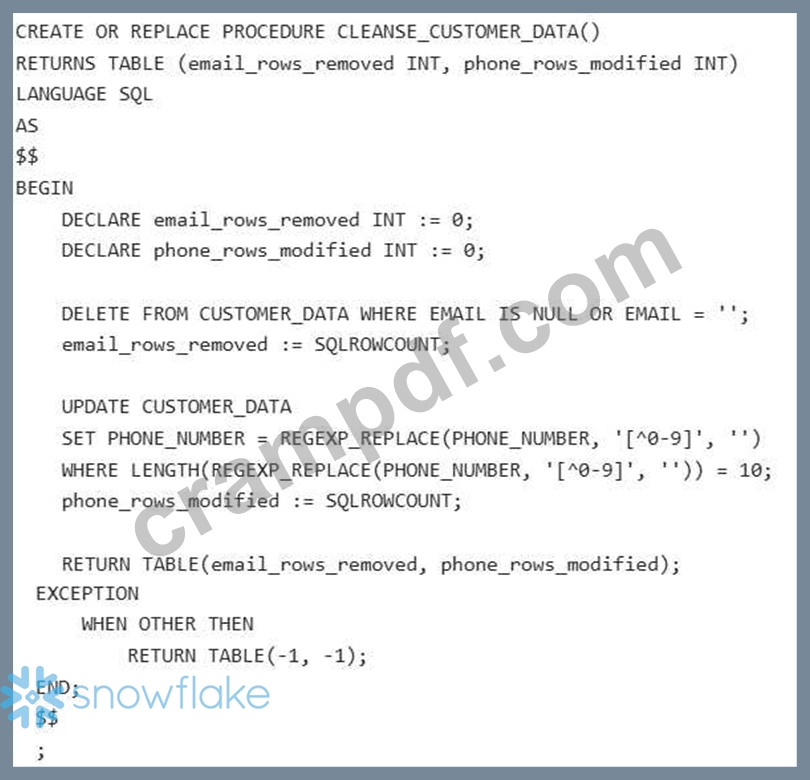
You are tasked with creating a stored procedure in Snowflake to perform data cleansing on a table named 'CUSTOMER DATA'. The procedure should: 1) Remove rows where the 'EMAIL' column is NULL or empty. 2) Standardize the 'PHONE NUMBER' column by removing all non-numeric characters and ensuring it's exactly 10 digits long. 3) Return the number of rows removed due to invalid emails and the number of rows modified due to phone number standardization. Assume the table already exists and contains columns 'CUSTOMER (INT), (VARCHAR), and 'PHONE NUMBER (VARCHAR). Which of the following code snippets correctly implements this stored procedure? The procedure should use exception handling to gracefully handle errors, returning -1 for both counts if any error occurs.
- A.
- B.
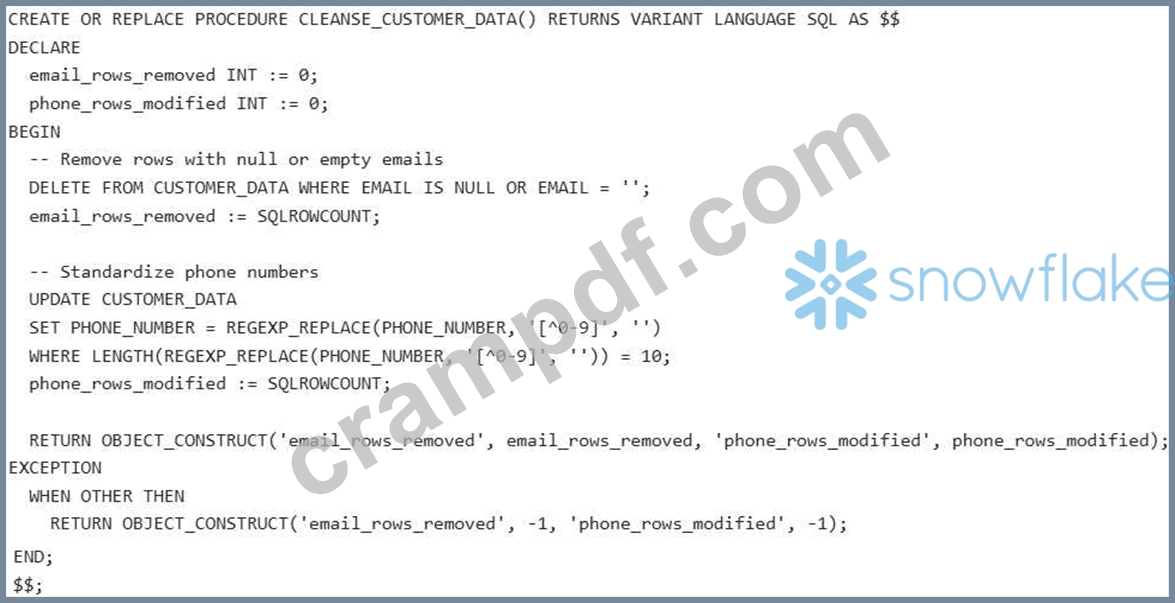
- C.
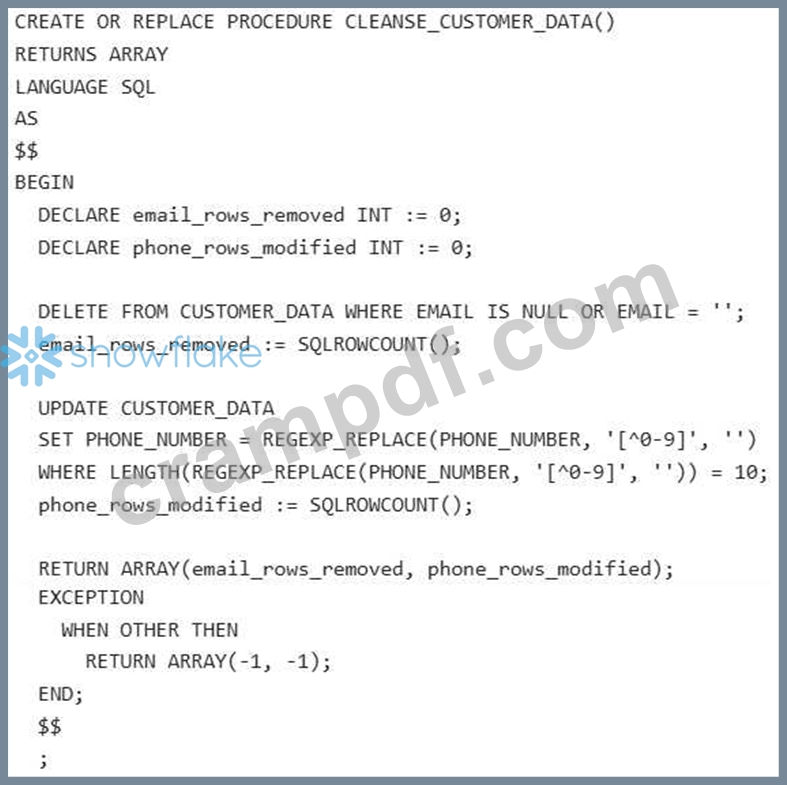
- D.
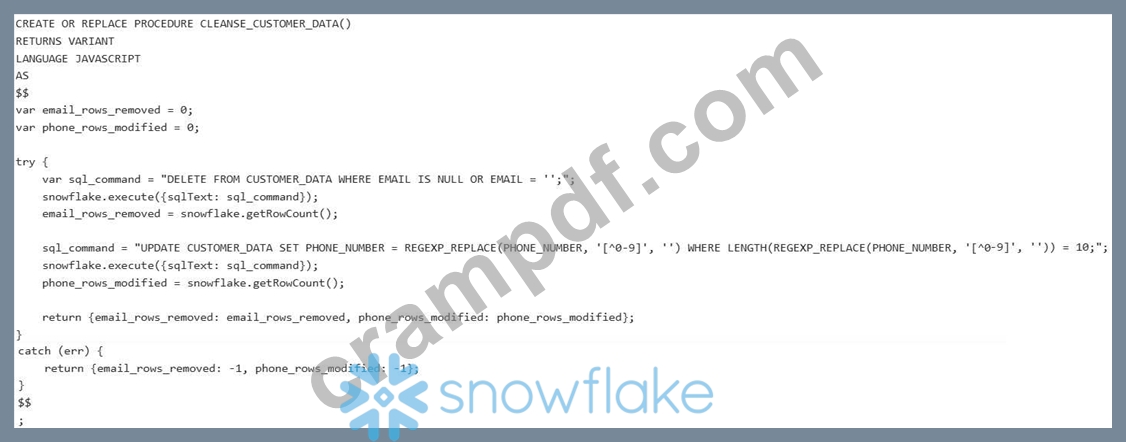
- E. None of the above.
Answer: B
Explanation:
Option A is correct because it uses SQL to perform the data cleansing tasks, correctly utilizes 'SQLROWCOUNT' to capture the number of affected rows, and returns the results as a VARIANT OBJECT. It also includes proper exception handling. Options B, C, and D have errors in syntax or logic regarding return types, variable declaration, or how to retrieve row counts. Specifically, using Javascript or returning an ARRAY/TABLE when VARIANT is more flexible in this scenario.
NEW QUESTION # 85
You are building a dashboard in Power BI that connects to Snowflake. The dashboard needs to display the trend of daily active users (DAU) for the past year. The 'USER_ACTIVITY table in Snowflake contains columns: 'USER ONT), 'ACTIVITY DATE (DATE), and 'ACTIVITY TYPE (VARCHAR). Due to the large size of the 'USER ACTIVITY table, query performance is critical. Which of the following strategies will BEST optimize the query executed by Power BI against Snowflake to calculate DAU?
- A. Create a materialized view in Snowflake that pre-calculates the DAU for each day, then connect Power BI to this materialized view.
- B. Import the entire 'USER ACTIVITY table into Power BI using Power BI Desktop's data import functionality and calculate DAU within Power BI'S data model.
- C. Using a scheduled task in Snowflake, regularly create a summary table containing daily active users, then connect Power BI to that summary table.
- D. Directly query the 'USER_ACTIVITY table from Power BI using a DAX measure to calculate distinct user counts per day. Rely on Power BI'S query folding capabilities to optimize the query sent to Snowflake.
- E. Create a Snowflake view that calculates the DAU for each day using 'COUNT(DISTINCT USER_ID)' and 'GROUP BY ACTIVITY_DATE' , then connect Power BI to this view.
Answer: A
Explanation:
Creating a materialized view that pre-calculates the DAU for each day is the most effective approach for optimizing query performance. Materialized views store the results of the query, so Power BI only needs to retrieve the pre-calculated DAU values, avoiding the expensive 'COUNT(DISTINCTY operation on the entire 'USER_ACTIVITY table. Option A might not fold completely and still execute poorly. Option B is better than A but does not provide performance like a Materialized View. Option D brings all the data into Power 31, which is not scalable or efficient. Option E is a valid option but has additional management overhead compared to materialized views.
NEW QUESTION # 86
Your organization is migrating a large on-premise data warehouse (100 TB) to Snowflake. The existing data warehouse contains complex data transformations implemented in stored procedures. During the migration, you need to minimize downtime and accurately estimate the data volume transferred to Snowflake. You decide to use a hybrid approach with both batch and incremental loading. Which of the following strategies would be MOST appropriate?
- A. Utilize Snowflake Connectors (e.g., Kafka connector) to stream data directly from the on-premise data warehouse to Snowflake. Implement a data replication tool to handle the initial data load and ongoing synchronization.
- B. Create external tables pointing to the on-premise data warehouse. Run queries directly against the external tables to transform and load the data into Snowflake. Once all data is loaded, drop the external tables. Use 'TABLE_SIZE function for sizing calculation.
- C. Use Snowflake's Data Exchange to directly replicate the on-premise data warehouse to Snowflake. Rely on Data Exchange's built-in monitoring to track the data volume transferred.
- D. Perform a full batch load of the historical data using Snowpipe from a cloud storage location. After the initial load, implement a change data capture (CDC) solution using a third-party tool (e.g., Debezium, Qlik Replicate) to incrementally load changes into Snowflake.
- E. Implement a custom ETL pipeline using Apache Spark to extract data from the on-premise data warehouse, perform transformations, and load the data into Snowflake using the Snowflake JDBC driver. Continuously run Spark jobs to keep the data synchronized.
Answer: D
Explanation:
Option B is the most appropriate strategy. It allows for a faster initial load using Snowpipe, leveraging the scalability of cloud storage. Implementing a CDC solution minimizes downtime and ensures data synchronization after the initial load. The combined approach addresses both the large data volume and the need for continuous updates.
NEW QUESTION # 87
How do Snowsight dashboards enable effective data presentation for business use analyses?
- A. Snowsight dashboards rely solely on text-based representations.
- B. Snowsight offers limited data representation options.
- C. They enable diverse data representation for effective analyses.
- D. Snowsight doesn't support visual data representation.
Answer: C
Explanation:
Snowsight dashboards enable diverse data representation for effective analyses in business use cases.
NEW QUESTION # 88
You are tasked with loading a large CSV file containing website traffic data into Snowflake. The CSV file has the following characteristics: Header row is present. Fields are enclosed in double quotes. The delimiter is a pipe (l) character. One column, 'timestamp' , is stored as milliseconds since the epoch and needs to be converted to a Snowflake TIMESTAMP NTZ. Which of the following COPY INTO statement options would correctly load the data, handle the delimiter and quotes, and convert the 'timestamp' column?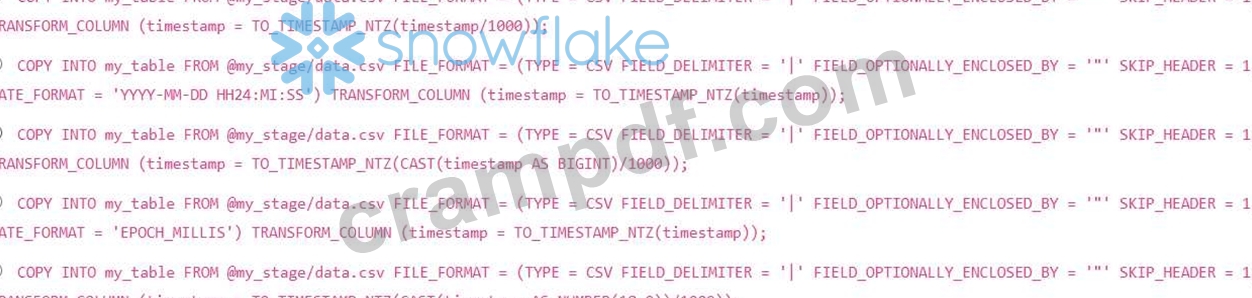
- A. Option B
- B. Option D
- C. Option A
- D. Option E
- E. Option C
Answer: D
Explanation:
Option E is correct because it correctly handles the milliseconds since epoch conversion. It casts the 'timestamp' column to a to ensure accurate division and then divides by 1000 to convert milliseconds to seconds before applying TO_TIMESTAMP_NTZ. Option A is incorrect because timestamp could be a String. Option B is incorrect as date format is not relevant here and it doesn't divide by 1000. Option C is incorrect because BIGINT might not be sufficient for large timestamps. Option D is incorrect because = 'EPOCH MILLIS" is used in file format options, not transform column.
NEW QUESTION # 89
You are tasked with ingesting data from a variety of external sources (JSON, CSV, Parquet) into Snowflake to build a unified customer profile. The sources contain inconsistencies in data types, null handling, and naming conventions. Your goal is to create a robust ingestion pipeline that identifies data quality issues and prepares the data for analysis. Which combination of Snowflake features and approaches would be most effective for achieving this?
- A. Utilize Dynamic Tables with appropriate transformation logic defined to handle inconsistencies and maintain data quality during ingestion. Leverage Snowflake's data governance features in conjunction with Dynamic Tables for comprehensive data management
- B. Build a custom data ingestion application using the Snowflake Connector for Python, implementing complex data transformations and quality checks within the application before loading the data into Snowflake. Store raw data as is for future use.
- C. Employ a third-party ETL tool integrated with Snowflake, configure data cleansing and transformation rules within the ETL tool, and load the transformed data into Snowflake using its optimized connectors.
- D. Use Snowpipe with schema evolution enabled and rely solely on Snowflake's automatic data type conversion. Implement data quality checks in downstream views.
- E. Leverage Snowflake's data governance features with data profiling, implement data quality rules in a data catalog, and use a combination of Snowpipe and COPY INTO with data transformations within the COPY INTO statement.
Answer: A,B,C,E
Explanation:
Options B, C, D, and E represent robust approaches. B combines data governance and built-in transformations. C allows for custom logic using the Python connector. D uses a specialized ETL tool. E leverages Dynamic Tables for automated transformations and data quality maintenance. A is insufficient as it relies too heavily on automatic conversion and delays quality checks. The best approach would involve data profiling to understand the data, implementing data quality rules at the point of ingestion or through dynamic tables, and leveraging a transformation approach suited to the complexity of the transformations.
NEW QUESTION # 90
You are tasked with creating a data pipeline that ingests data from various sources, including a Snowflake Marketplace data share, and prepares it for analysis. The pipeline involves several transformations and enrichments. Which of the following methods offer the BEST approach to manage data lineage and auditability within this pipeline, considering the shared data from the Marketplace?
- A. Rely solely on Snowflake's query history and table metadata to track data lineage.
- B. Create a series of temporary tables at each stage of the pipeline to store intermediate results and track data lineage.
- C. Use Snowflake's 'SYSTEM$GET_PREDECESSORS' and functions combined with a metadata repository to capture and visualize data lineage.
- D. Replicate the data share's tables into your own database and track changes on the replicated tables.
- E. Implement a custom logging system that records each transformation step and data source, including the data share details.
Answer: C
Explanation:
Option C is the best approach. Snowflake's built-in functions like 'SYSTEM$GET_PREDECESSORS' and allow you to programmatically trace the dependencies and data flow within your Snowflake environment, including data accessed from shares. Combining this information with a metadata repository provides a robust and auditable data lineage solution. Option A is insufficient as it doesn't provide a structured and easily navigable lineage. Option B is viable but requires significant manual effort to maintain and scale. Option D creates unnecessary storage overhead and doesn't inherently improve data lineage tracking. Option E is not recommended as replicating shared data goes against the purpose of data sharing and can lead to synchronization issues.
NEW QUESTION # 91
You are analyzing customer order data in Snowflake. The 'orders' table has columns: and 'order_totar. Your task is to identify the top 5 customers who have consistently placed high-value orders over time. You need to rank customers based on their average order total, but only consider customers who have placed at least 10 orders. Furthermore, you want to account for the recency of orders by applying a weighted average where more recent orders contribute more to the average. Which of the following approaches will efficiently achieve this goal in Snowflake?
- A. Use a QUALIFY clause in conjunction with window functions to filter customers with at least 10 orders and calculate both average and weighted average. Then use the ranking function over the weighted average.
- B. Create a stored procedure to iterate through each customer, calculate the weighted average order total, and then rank them in the application layer.
- C. Use a weighted average calculation involving a date-based weighting factor (e.g., days since the order date), calculate the average order total with this weighting, filter with COUNT( ) >= 10 using HAVING, and then rank using RANK() OVER (ORDER BY weighted_average_order_total DESC).
- D. Calculate the average order total using AVG(), filter customers with COUNT( ) >= 10 using HAVING, then rank them using RANK() OVER (ORDER BY average_order_total DESC).
- E. Calculate the average order total and order count for each customer using a subquery, then join the results with a generated series of dates to calculate the weighted average in the outer query, finally ranking the customers using DENSE_RANK().
Answer: A,C
Explanation:
Both options B and E correctly address the problem. B calculates a weighted average, filters based on the minimum order count, and then ranks customers based on the weighted average. E achieves the same result in using QUALIFY which is an important technique to filter. Option A doesn't account for weighting. C is inefficient and does not leverage Snowflake's processing power. D is unnecessarily complex with join, date series and subquery for simple operation that can be achieved using window functions.
NEW QUESTION # 92
You are creating a Snowsight dashboard to display the results of an A/B test on a website. You have the following tables: (columns: 'USER_ID', 'VARIANT' (VARCHAR, either 'A' or 'B'), 'CONVERSION' (BOOLEAN), 'TIMESTAMP') 'USER DEMOGRAPHICS' (columns: 'USER_ID, 'REGION', 'DEVICE) The stakeholders want to see the following visualizations: 1. Overall conversion rate for each variant. 2. Conversion rate for each variant broken down by region. 3. A table showing the statistical significance (p-value) of the difference in conversion rates between variants for each region, using a Chi-Square test. (Assume you have access to a stored procedure CHI SQUARE TEST(variant_a_conversions INT, variant_a_total INT, variant_b_conversions INT, variant b total INT) that returns the p-value.) Which combination of queries and Snowsight features will achieve the desired outcome with optimal performance and maintainability?
- A. Create a task to aggregate the number of conversions and total views from the ab test data daily. Create views using the aggregated table to build the requested charts in Snowsight.
- B. Create a stored procedure that takes 'start_date' and 'end_date' as parameters, performs all calculations (conversion rates and Chi-Square tests), and returns three result sets for the visualizations. Use the stored procedure as the data source for the Snowsight dashboard.
- C. Create three separate charts using raw SQL queries for each visualizatiom Calculate the p-value outside of Snowflake using Python and load it into a new table. Use this new table to display a table chart with p-values.
- D. Create two views: 'VARIANT CONVERSION RATES': Calculates the overall and regional conversion rates. RESULTS': Executes for each region based on the view. Create three charts in Snowsight, using the views for the conversion rates and statistical significance table.
- E. Create a single view 'COMBINED_DATX that joins and ' USER_DEMOGRAPHICS'. Use this view in Snowsight to create all three charts. Use calculated fields in Snowsight to determine conversion rates and call the stored procedure for p-value within the calculated field.
Answer: D
Explanation:
Option B is the most efficient and maintainable. Creating two views allows for clean separation of concerns and reusability. 'VARIANT CONVERSION RATES pre-calculates the conversion rates, making the statistical significance calculation in cleaner and more performant. The resulting Snowsight dashboard is then simple to build using these views. Option A introduces unnecessary complexity by involving external tools (Python) and creating a new table. Option C attempts to do too much within Snowsight's calculated fields, which is not ideal for complex calculations like calling stored procedures. Option D might be performant, but makes the data presentation inflexible and ties the data to this specific dashboard. Option E is good to have the data aggregated, however it depends on option B to create the dashboard with the aggregated data.
NEW QUESTION # 93
You are tasked with aggregating website clickstream data in Snowflake to identify the most popular product categories per region on a daily basis. The clickstream data is stored in a table named 'clickstream eventS with columns: 'event_time', 'user id', 'product id', 'region', and 'category'. You need to create a solution that efficiently identifies the top 3 categories for each region on each day. Which approach offers the best performance and scalability considering the dataset size is expected to grow significantly?
- A. Using a simple GROUP BY operation to count the occurrences of each category, region, and day, then relying on external tools to filter the top 3.
- B. Using a combination of GROUP BY, RANK() window function, and a subsequent filter. This approach calculates the rank for each category within each region and day, then filters to keep only the top 3.
- C. Creating a series of temporary tables for each region, aggregating the data, and then using a JOIN operation to combine the results.
- D. Implementing a stored procedure that iterates through each region and day, calculating the category counts and selecting the top 3 using procedural logic.
- E. Using a combination of GROUP BY, DENSE_RANK() window function, and a subsequent filter. This approach calculates the rank for each category within each region and day, then filters to keep only the top 3. DENSE RANK handles ties more gracefully.
Answer: E
Explanation:
Option D is the most efficient and scalable because it leverages Snowflake's built-in window functions (DENSE_RANK) for efficient ranking within partitions (region and day). Window functions are optimized for parallel processing. DENSE RANK handles ties appropriately (assigning the same rank to tied categories). Options A is similar but DENSE_RANK is better for the case of ties. Option B would be slow and not scalable due to the iterative nature of stored procedures. Option C is inefficient due to the creation of temporary tables and JOIN operations. Option E offloads the crucial filtering to external tools, impacting performance.
NEW QUESTION # 94
You are responsible for loading data into a Snowflake table named 'CUSTOMER DATA' from a series of compressed JSON files located in a Google Cloud Storage (GCS) bucket. The data volume is significant, and the loading process needs to be as efficient as possible. The JSON files are compressed using GZIP, and they contain a field called 'registration date' that should be loaded as a DATE type in Snowflake. However, some files contain records where the 'registration_date' is missing or has an invalid format. Your goal is to load all valid data while skipping any files that contain invalid dates, and log any files that contain invalid records. You want to choose the most efficient approach. Which of the following options represents the best strategy to achieve this?
- A. create a file format object specifying 'TYPE = JSON' and 'COMPRESSION = GZIP. Use a COPY INTO command with 'ON_ERROR = SKIP_FILE. Implement a scheduled task to query the COPY HISTORY view to identify any skipped files and manually investigate the errors.
- B. create a file format object specifying 'TYPE = JSON' and 'COMPRESSION = GZIP'. Use a COPY INTO command with a transformation function 'TRY Configure the 'CUSTOMER DATA' table with a default value for 'registration_date' and use 'ON ERROR = CONTINUE'.
- C. Create a file format object specifying 'TYPE = JSON' and 'COMPRESSION = GZIP. Use a COPY INTO command with a transformation function 'TO DATE(registration_datey and SON ERROR = CONTINUE. Use a validation table to store rejected records.
- D. Create a file format object specifying 'TYPE = JSON' and 'COMPRESSION = GZIP. Use a COPY INTO command with a transformation function 'TRY TO DATE(registration_date)' and 'ON ERROR = SKIP FILE. Implement a separate process to validate the loaded data for NULL 'registration_date' values.
- E. Use Snowpipe with a file format object specifying 'TYPE = JSON' and 'COMPRESSION = GZIP'. Configure error notifications for the pipe and handle errors manually.
Answer: B
Explanation:
The correct answer is E. Using gracefully handles invalid dates by returning NULL, which can be managed using a default value on the target table. 'ON ERROR = CONTINUE' ensures the loading process doesn't halt. Combining this with a default value provides for a fast, efficient load. Option A skips the entire file, which is not desired if only some records are invalid. Option B will halt the load process if the target field cannot accept a value. Option C is valid but requires a separate process. Option D makes the manual handling more complex since Snowpipe is designed for near real time instead of batch. E is the best option as all invalid fields will be populated with the default value and load will be unaffected.
NEW QUESTION # 95
You have a Snowflake table named 'orders' with columns (INT), (DATE), and (VARIANT). The 'order_detailS column contains a JSON object with information about items in the order, including a nested array of items called 'items' , where each item has a (INT) and 'quantity' (INT). You need to write a SQL query to extract all 'product_id' values from the 'items' array within the column for orders placed in the last 30 days. Which query will accomplish this most effectively?
- A.

- B.

- C.

- D.

- E.

Answer: D
Explanation:
Option A correctly uses the 'LATERAL FLATTEN' function to unnest the 'items' array within the 'order_details variant column. This creates a row for each item in the array, allowing you to access the 'product_id' for each item. The 'WHERE clause filters the results to only include orders from the last 30 days. Options B, C, D and E do not correctly use the 'FLATTEN' function and would only retrieve the product_id of the first item in the array, if the array exists.
NEW QUESTION # 96
When cleaning data, what role does using clones play in specific use-cases?
- A. Clones slow down the data cleaning process significantly
- B. Clones are unnecessary for data cleaning tasks
- C. Clones help preserve original data for audit purposes only
- D. Clones aid in isolating and resolving data anomalies
Answer: D
Explanation:
Clones are beneficial in isolating and resolving data anomalies without impacting the original dataset, facilitating safe data cleaning practices.
NEW QUESTION # 97
......
Get DAA-C01 Braindumps & DAA-C01 Real Exam Questions: https://www.crampdf.com/DAA-C01-exam-prep-dumps.html
Snowflake DAA-C01 Actual Questions and Braindumps: https://drive.google.com/open?id=1O3rJ0Kn4Es_CzDF0TxMghlXoKs56S8Dq